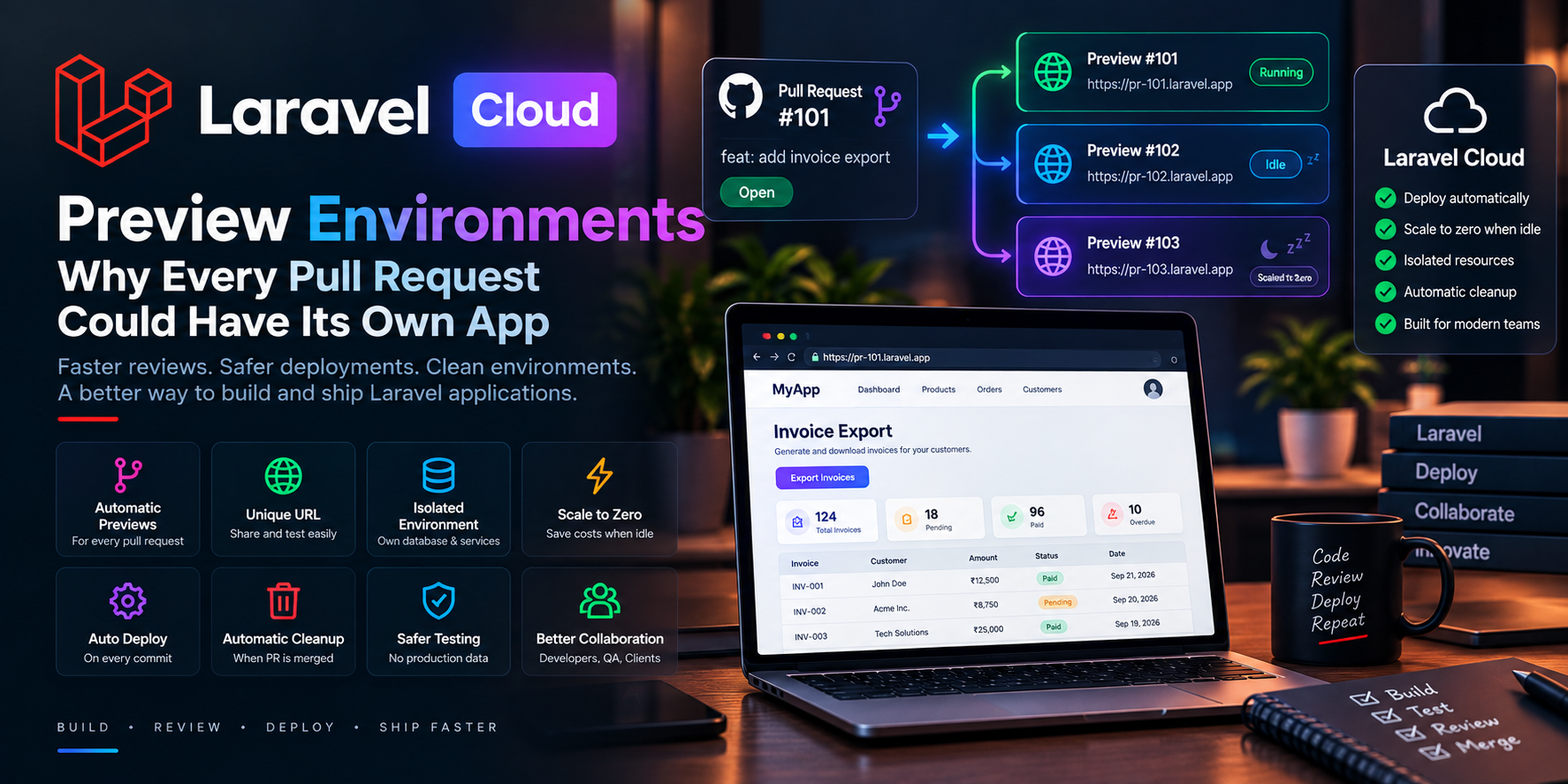
🚀 Laravel Preview Environments: Why Every Pull Request Could Have Its Own App
Imagine opening a pull request and immediately getting a URL where anyone on your team can test the feature.
No need to:
- 📦 Pull the branch locally
- ⚙️ Configure the project
- 🗄️ Set up a database
- 🔧 Configure environment variables
- 🔀 Replace someone else's staging deployment
- 🎥 Record a video to demonstrate the feature
Instead, you simply share the preview URL.
This is the idea behind Laravel Cloud's new preview environments, announced on September 28, 2026. Each pull request can have its own deployed environment, and Laravel Cloud can automatically clean it up when the pull request is merged or closed.
The interesting part is that these environments can also scale to zero when idle.
Let's look at why this matters for modern Laravel development. 👇
🌐 What Is a Preview Environment?
A preview environment is a temporary deployment created specifically for testing a particular code change.
Instead of having one shared staging environment:
Developers
    ↓
     Staging
    ↓
Shared Application
you can have:
Pull Request #101
       ↓
Preview #101

Pull Request #102
       ↓
Preview #102

Pull Request #103
       ↓
Preview #103
Each developer can work on a feature without interfering with another developer's branch.
Laravel Cloud's preview environment workflow can automatically create a deployment when a pull request is opened, assign it a unique URL, and update the preview when new commits are pushed.
🔗 A Working Application Inside the Pull Request
One of the biggest advantages is the connection between code review and application review.
A typical pull request might contain:
Pull Request
├── Code changes
├── Tests
├── Comments
└── Preview URL
A reviewer doesn't have to understand the entire development environment just to test the feature.
They can open the URL and interact with the application.
This is especially useful for frontend changes.
For example, suppose you're adding a new dashboard.
A reviewer can immediately check:
- 🎨 Layout
- 📱 Mobile responsiveness
- 🔘 Buttons
- 🧭 Navigation
- 📊 Charts
- ⚡ Loading states
- ❌ Error states
The review becomes more than simply reading code.
🤖 Why This Matters More in the AI Coding Era
AI coding agents are making it easier to create large numbers of code changes and pull requests.
But generating code isn't the same as verifying the user experience.
Laravel's announcement specifically highlights this shift: as AI agents become better at producing working code, actually reviewing the experience of the change becomes increasingly important.
Think about the workflow:
AI Agent
   ↓
Creates Code
   ↓
Opens Pull Request
   ↓
Preview Environment
   ↓
Human Reviews
   ↓
Merge
This creates a useful separation:
AI can help create the change. Humans can verify the result.
💰 What Is Scale-to-Zero?
There's an obvious problem with creating an environment for every pull request:
What happens to the infrastructure cost?
If you have ten developers and twenty open pull requests, continuously running twenty complete environments could become expensive.
That's where scale-to-zero comes in.
When a preview environment is idle, supported resources can sleep.
When someone accesses the environment again, those resources can wake up.
Laravel describes this as a natural fit for preview environments because they often spend much of their lifetime waiting for someone to review them.
The basic idea is:
Active
  ↓
Application running
  ↓
No activity
  ↓
Scale to zero
  ↓
Someone opens preview
  ↓
Resources wake up
🧪 Test Closer to Production
Local development is extremely useful.
But local environments don't always behave exactly like production.
A preview deployment provides an opportunity to test the application in a more realistic environment.
You can test things such as:
- 🌐 Real HTTP requests
- 🗄️ Database behavior
- ⚡ Queues
- 📧 Email integrations using sandbox credentials
- 🔐 Authentication
- 📡 External APIs
- 📱 Browser behavior
- 🏗️ Deployment configuration
Laravel specifically points out that preview environments can be used for browser tests, sandbox integrations, and verifying build and deployment commands.
This can expose configuration problems before they reach production.
🗄️ Don't Connect Previews to Production Data
This is one of the most important rules when implementing preview environments.
Your preview should generally have its own:
- Database
- Cache
- Queue resources
- Storage
- Test credentials
For example:
Production
├── Production Database
├── Production Cache
└── Production Services

Preview
├── Preview Database
├── Preview Cache
└── Sandbox Services
Laravel recommends keeping production databases and other live resources separate because a preview connected to production could modify real data or trigger real actions.
That's especially important when AI-generated code is being tested.
🌱 Seed Test Data Automatically
Preview environments become even more useful when they start with realistic test data.
For example:
php artisan migrate --seed
Your preview could contain:
👤 Demo Users
📦 Sample Products
🛒 Test Orders
💳 Test Payments
📊 Example Reports
This allows reviewers to test a feature immediately.
For example, if you're developing an order-management feature, the reviewer shouldn't have to manually create ten customers and twenty orders before testing it.
🔐 Environment Variables Need Care
Preview environments should not automatically inherit production secrets.
Instead, define environment variables specifically for the preview.
For example:
APP_ENV=preview

MAIL_MAILER=log

PAYMENT_MODE=sandbox

STRIPE_KEY=TEST_KEY

DB_DATABASE=preview_database
This creates a safer testing environment.
Never assume that because an environment is temporary, it doesn't need security controls.
🔄 Automatic Cleanup
Another useful part of the workflow is automatic cleanup.
A typical lifecycle could look like:
Pull Request Opened
        ↓
Preview Created
        ↓
Developer Pushes Code
        ↓
Preview Updated
        ↓
Reviewer Tests
        ↓
Pull Request Merged
        ↓
Preview Deleted
Laravel Cloud can automatically remove the preview environment and resources when the pull request is merged or closed.
That reduces the amount of manual infrastructure management required.
📱 Example: Building a New Laravel Feature
Imagine you're developing a new customer invoice export.
The feature includes:
Invoice Export
├── New UI button
├── Database query
├── Queue job
├── File generation
└── Notification
Automated tests can verify much of the backend logic.
But a reviewer may still want to answer:
Does the button make sense?
What happens while the export is processing?
Where does the downloaded file appear?
Does the notification look correct?
Does the feature work on mobile?
A preview environment lets the reviewer test the complete flow.
🧑💻 Preview Environments vs Shared Staging
A shared staging server might look like:
Developer A ──┐
Developer B ──┼──> Shared Staging
Developer C ──┘
This can create conflicts.
Developer A deploys a feature.
Developer B deploys another feature.
Now the staging environment contains both changes.
With preview environments:
Developer A → Preview A

Developer B → Preview B

Developer C → Preview C
Each feature gets its own isolated space.
This can make parallel development much easier.
⚡ A Better CI/CD Workflow
Preview environments can become another stage in your CI/CD pipeline.
For example:
Git Push
   ↓
Automated Tests
   ↓
Pull Request
   ↓
Preview Deployment
   ↓
Human Review
   ↓
Approval
   ↓
Production Deployment
This adds an important validation step between automated tests and production.
Tests answer:
"Does the code behave correctly according to our automated checks?"
Preview environments help answer:
"Does the actual application experience make sense?"
Both questions matter. 🧪
🤖 The Future of AI-Assisted Development
AI coding tools are changing software development.
Developers can now generate:
- Controllers
- Models
- Migrations
- Tests
- API endpoints
- Frontend components
- Documentation
much faster than before.
But faster code generation creates another challenge:
How do we review more changes without sacrificing quality?
Preview environments can help by giving every change a real place to be tested.
The workflow becomes:
AI
 ↓
Code
 ↓
Tests
 ↓
Preview
 ↓
Human Review
 ↓
Production
That's a powerful combination of automation and human validation. 🤝
🚀 Who Can Benefit From Preview Environments?
Preview environments can be particularly useful for:
👨💻 Development Teams
Multiple developers can work on separate features without competing for a shared staging server.
🎨 Designers
Designers can interact with the actual implementation rather than relying only on screenshots.
🧪 QA Teams
QA engineers can test individual features independently.
👥 Clients
Clients can receive a link to test a feature before it reaches production.
🤖 AI-Assisted Teams
Teams using coding agents can inspect the actual application generated by automated development workflows.
🛠️ Getting Started
Laravel Cloud provides preview-environment configuration under the environment's settings.
A typical setup involves:
- 🔧 Enable preview environments.
- 🌿 Define which branches or pull requests should trigger them.
- ⚙️ Configure environment variables.
- 🗄️ Choose preview resources.
- 🚀 Configure deployment behavior.
- 🧹 Configure cleanup behavior.
- 🧪 Open a pull request and test the workflow.
Laravel's documentation provides the available configuration options.
⚠️ Things to Consider
Preview environments are powerful, but they don't remove the need for good engineering practices.
Remember to consider:
- 🔐 Secret management
- 🗄️ Database isolation
- 💰 Resource costs
- 📧 Sandbox email
- 💳 Test payment credentials
- 🔌 External API limits
- 🧹 Automatic cleanup
- 📊 Monitoring
- 🛡️ Access control
And most importantly:
Never assume a preview environment is automatically safe just because it is temporary.
🎯 Final Thoughts
The combination of preview environments and scale-to-zero is an interesting development in modern Laravel deployment.
Instead of treating staging as one shared server, teams can create an isolated, working environment for each feature.
And because idle resources can scale down, those environments don't necessarily need to remain fully active all day.
The bigger idea goes beyond Laravel Cloud.
Modern development is moving toward a workflow where:
Every change can be built, deployed, tested, reviewed, and removed independently. 🚀
With AI coding agents producing changes faster, having a reliable way to inspect the actual running application becomes increasingly valuable.
The next time someone asks:
"Can I try the feature?"
The answer can simply be:
"Sure — here's the preview link." 🔗✨
Sources
Laravel's official announcement describes the preview-environment workflow, automatic deployment and cleanup, isolated resources, browser testing, environment variables, and scale-to-zero behavior.

forum Discussion & Comments 0
rate_review Leave a Comment