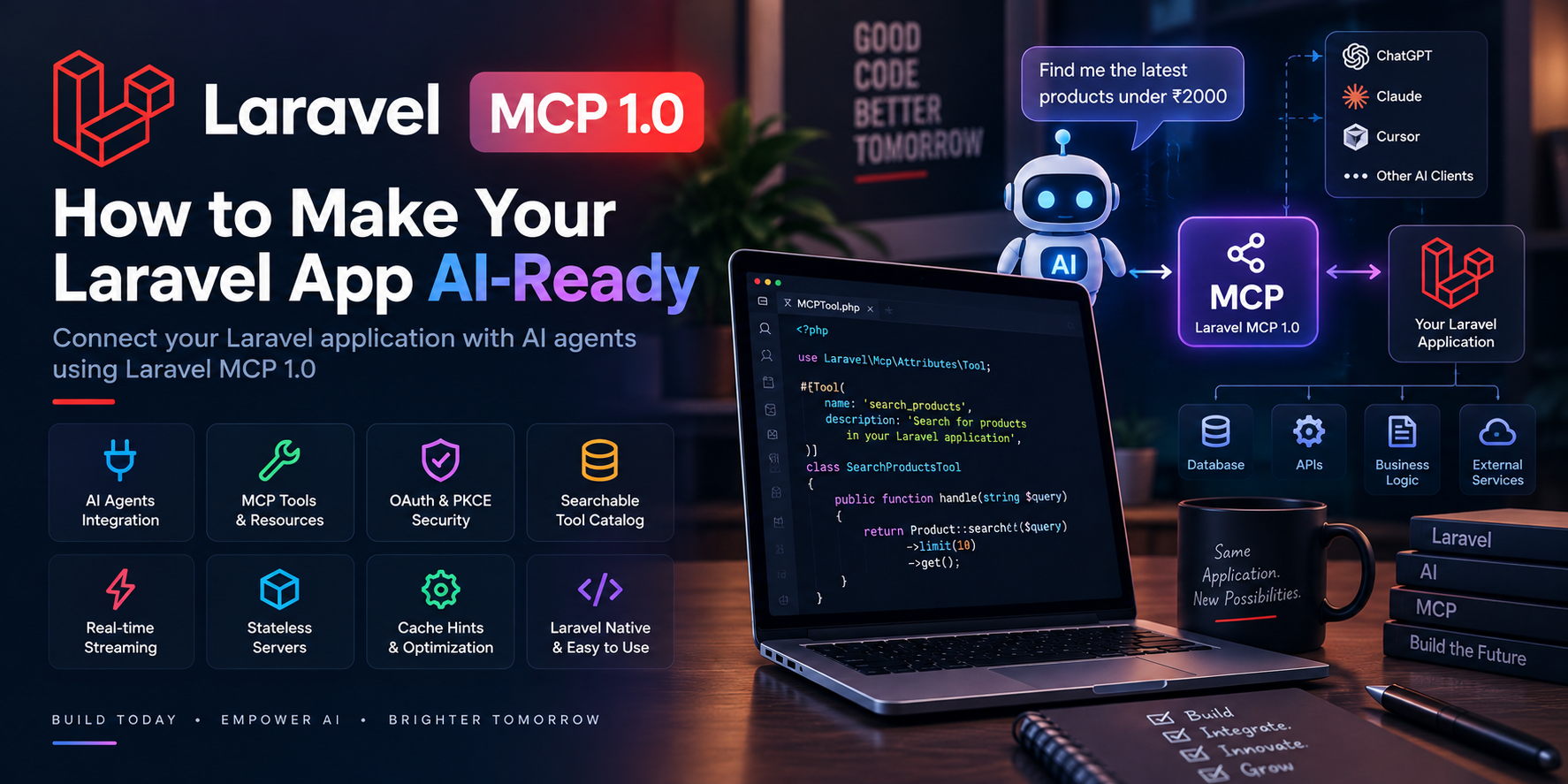
🚀 Laravel MCP 1.0: How to Make Your Laravel App AI-Ready
AI is rapidly changing how users interact with software.
Instead of opening an application, navigating through multiple screens, and manually performing every action, users can increasingly interact with AI assistants that understand what they want and can work with connected applications.
But how does an AI assistant securely interact with your application's data and functionality?
That's where Model Context Protocol (MCP) comes in. 🤖
And now, Laravel developers have an official stable solution: Laravel MCP 1.0.
Laravel MCP 1.0 was released in September 2026 as the first stable version of Laravel's MCP package. It provides tools for creating MCP servers, tools, prompts, resources, authentication, testing, and real-time streaming inside Laravel applications.
🤔 What Is MCP?
Model Context Protocol (MCP) is a standardized way for AI applications to interact with external systems.
Think of a traditional application like this:
User
  ↓
Web Browser
  ↓
Laravel Application
  ↓
Database
With MCP, an AI client can become another entry point:
User
  ↓
AI Assistant
  ↓
MCP Server
  ↓
Laravel Application
  ↓
Database / APIs / Services
The important idea is that your Laravel application can expose carefully defined capabilities that an AI client can discover and use.
For example, an e-commerce application could expose tools such as:
getProduct()
searchProducts()
checkInventory()
createOrder()
getOrderStatus()
An AI assistant could then use those capabilities when responding to a user.
🧠 Why Is This Important for Laravel Developers?
For years, developers have built applications primarily around three interfaces:
- 🌐 Web interfaces
- 📱 Mobile applications
- 🔌 APIs
AI is becoming another important interface.
Instead of only asking users to interact with buttons, forms, and dashboards, applications can expose selected functionality to AI systems.
For example, imagine a business management application.
A user could ask:
"Show me this month's unpaid invoices."
The AI could use an MCP tool to retrieve the relevant information.
Or:
"Create a support ticket for customer #1024."
The AI could call a Laravel tool that creates the ticket.
The AI isn't directly accessing your database. Your application controls what functionality is exposed through MCP.
That's an important architectural distinction. 🔐
🚀 Laravel MCP 1.0
Laravel's official MCP package provides a Laravel-native way to build MCP servers.
The package can be installed through Composer:
composer require laravel/mcp
Laravel's official MCP documentation describes the package as an expressive interface for creating servers, tools, and resources for AI interactions.
This means Laravel developers can use familiar concepts such as:
- Dependency injection
- Middleware
- Authentication
- Testing
- Laravel's service container
- Application classes
rather than building an MCP implementation completely from scratch.
🛠️ What Are MCP Tools?
Tools are actions that an AI client can execute through your application.
Imagine a Laravel application that manages products.
You could expose a tool conceptually like:
class SearchProductsTool
{
    public function handle(string $query): array
    {
        return Product::query()
            ->where('name', 'like', "%{$query}%")
            ->limit(10)
            ->get()
            ->toArray();
    }
}
The AI doesn't need to know how your database works.
It only needs to know:
Tool:
search_products

Input:
query

Output:
matching products
Your Laravel application remains responsible for executing the actual business logic.
🔎 Searchable Tool Catalogs
One of the notable improvements in Laravel MCP 1.0 is support for searchable tool catalogs.
This matters because an AI agent may have access to many tools.
Sending every available tool definition to the model all the time can consume valuable context.
Laravel MCP 1.0 allows tools to be searched when they are needed instead of requiring the entire tool catalog to be loaded up front.
For a large application, this can make an important architectural difference.
Imagine an ERP application with:
Customers
Orders
Invoices
Products
Inventory
Employees
Reports
Payments
Notifications
Shipping
Instead of exposing hundreds of tools immediately, an AI agent can search for the relevant capabilities when required.
That's a much more scalable approach. 📈
💾 Cache Hints
Laravel MCP 1.0 also introduces cache hints.
An MCP server can tell a client how long certain responses can be cached and whether those responses can be shared across users.
This can be useful for information that doesn't change frequently.
For example:
Product categories → cache for 10 minutes
Company information → cache for 1 hour
Current account balance → don't cache
Laravel MCP provides attributes and APIs for defining these cache behaviors.
This becomes increasingly important as AI applications make repeated requests to connected services.
⚡ Stateless MCP Servers
Laravel MCP 1.0 supports the newer MCP protocol approach where requests can be processed independently.
Stateless servers can be easier to scale because each request doesn't necessarily depend on maintaining a server-side session.
This can be particularly useful when deploying applications across multiple servers or behind load balancers.
A simplified architecture could look like:
             ┌─── Server 1
AI Client ────┼─── Server 2
             └─── Server 3
                    ↓
              Laravel MCP
                    ↓
             Application Data
This type of architecture can make horizontal scaling easier.
🔐 OAuth and PKCE
Security becomes extremely important when AI systems can interact with application functionality.
Laravel MCP 1.0 includes updated OAuth behavior, including PKCE support and support for Client ID Metadata Documents.
For production applications, authentication should never be treated as an afterthought.
Before exposing an MCP server, developers should carefully consider:
- 🔐 Authentication
- 👤 User permissions
- 🛡️ Authorization
- 📝 Input validation
- 🔎 Audit logging
- 🚫 Rate limiting
- 🔒 Sensitive data protection
An AI agent should only be able to perform actions that the connected user is actually authorized to perform.
📡 Real-Time Streaming
Laravel's MCP tooling also supports real-time streaming through Server-Sent Events.
This can be useful when an AI operation takes time to complete.
Instead of waiting for a single final response, the client can receive progress or intermediate updates.
For example:
AI Request
    ↓
Laravel MCP
    ↓
Long-running operation
    ↓
Progress update
    ↓
Progress update
    ↓
Final response
This can create a much better experience for AI-powered applications. ✨
🧪 Testing AI Integrations
AI-powered functionality still needs testing.
Laravel MCP includes testing capabilities and an MCP Inspector that can help developers verify their MCP implementations.
You should test:
- ✅ Tool inputs
- ✅ Tool outputs
- ✅ Authorization
- ✅ Invalid requests
- ✅ Authentication failures
- ✅ Database operations
- ✅ Error handling
- ✅ Rate limiting
- ✅ Sensitive-data protection
Don't assume that because an AI model produced the correct request once, the system will always behave correctly.
AI applications should be treated as software systems that require normal engineering discipline.
🏗️ Example: Making an E-Commerce App AI-Ready
Imagine you have a Laravel e-commerce application.
Your existing application might contain:
Products
Orders
Customers
Inventory
Payments
Shipping
You could expose carefully selected MCP tools:
search_products
get_product
check_inventory
get_order
get_shipping_status
Now an AI assistant could potentially answer questions such as:
"Do you have wireless keyboards under ₹2,000?"
The AI could search products.
Or:
"Where is my order?"
The AI could retrieve the user's order and shipping information.
Or:
"Is the Logitech keyboard available?"
The AI could check inventory.
The important part is that the Laravel application still owns the business rules.
The AI is interacting with your application through defined capabilities.
🧩 MCP vs Traditional APIs
MCP doesn't necessarily replace APIs.
Instead, think of MCP as another interface on top of your application.
A modern application could have:
                 ┌── Web App
                 │
Laravel Backend ─┼── Mobile App
                 │
                 ├── REST API
                 │
                 └── MCP Server
                         ↓
                    AI Clients
Your REST API might continue serving mobile applications and third-party integrations while MCP provides a structured interface for AI clients.
This means MCP can complement your existing architecture rather than requiring you to rebuild everything.
🌟 What Could Laravel Developers Build?
The possibilities are broad.
🤖 AI Customer Support
Allow AI assistants to retrieve orders, customer information, shipping details, and support tickets.
🛒 AI Shopping Assistants
Let users search products, compare products, and check availability through conversational interfaces.
📊 Business Intelligence Assistants
Create tools that allow AI systems to retrieve business metrics and generate reports.
👨💻 Developer Assistants
Expose documentation, project information, deployment data, or internal development tools.
🏢 Internal Business Assistants
Connect an AI assistant to CRM, ERP, HR, inventory, or project-management functionality.
📚 Knowledge Systems
Expose company documents, knowledge bases, and structured resources to AI clients.
⚠️ Don't Give AI Unlimited Access
This is probably the most important lesson.
Just because MCP makes it technically possible to expose a capability doesn't mean you should expose it.
Avoid creating an unrestricted tool such as:
execute_any_sql()
or:
run_any_command()
Instead, expose narrowly defined business operations:
get_customer_orders()
create_support_ticket()
check_inventory()
The smaller and more controlled the capability, the easier it is to secure and audit. 🔐
🚀 Getting Started
If you're a Laravel developer interested in AI, Laravel MCP 1.0 is worth exploring.
A practical learning path is:
Step 1 — Learn MCP
Understand the basic concepts of servers, tools, resources, prompts, and clients.
Step 2 — Install Laravel MCP
composer require laravel/mcp
Step 3 — Build One Simple Tool
Start with something harmless such as:
search_products
Step 4 — Add Authentication
Don't expose sensitive application functionality without authentication and authorization.
Step 5 — Test Your MCP Server
Use the available testing tools and inspect requests and responses.
Step 6 — Expand Carefully
Once the architecture works, gradually introduce more capabilities.
🎯 Final Thoughts
Laravel MCP 1.0 is an important development for PHP and Laravel developers because it makes AI another practical entry point into Laravel applications.
Instead of building applications exclusively for browsers, mobile devices, and traditional API clients, developers can now design controlled interfaces specifically for AI agents and assistants.
The key isn't simply connecting an AI model to your application.
The real opportunity is building a secure architecture where:
AI understands → MCP connects → Laravel controls → Your application executes. 🚀
If you're already working with Laravel, APIs, queues, SaaS platforms, e-commerce, or business applications, MCP is a technology worth learning as the AI application ecosystem continues to evolve.
The AI era isn't only about smarter models.
It's also about making existing software AI-accessible. 🤖💻

forum Discussion & Comments 0
rate_review Leave a Comment